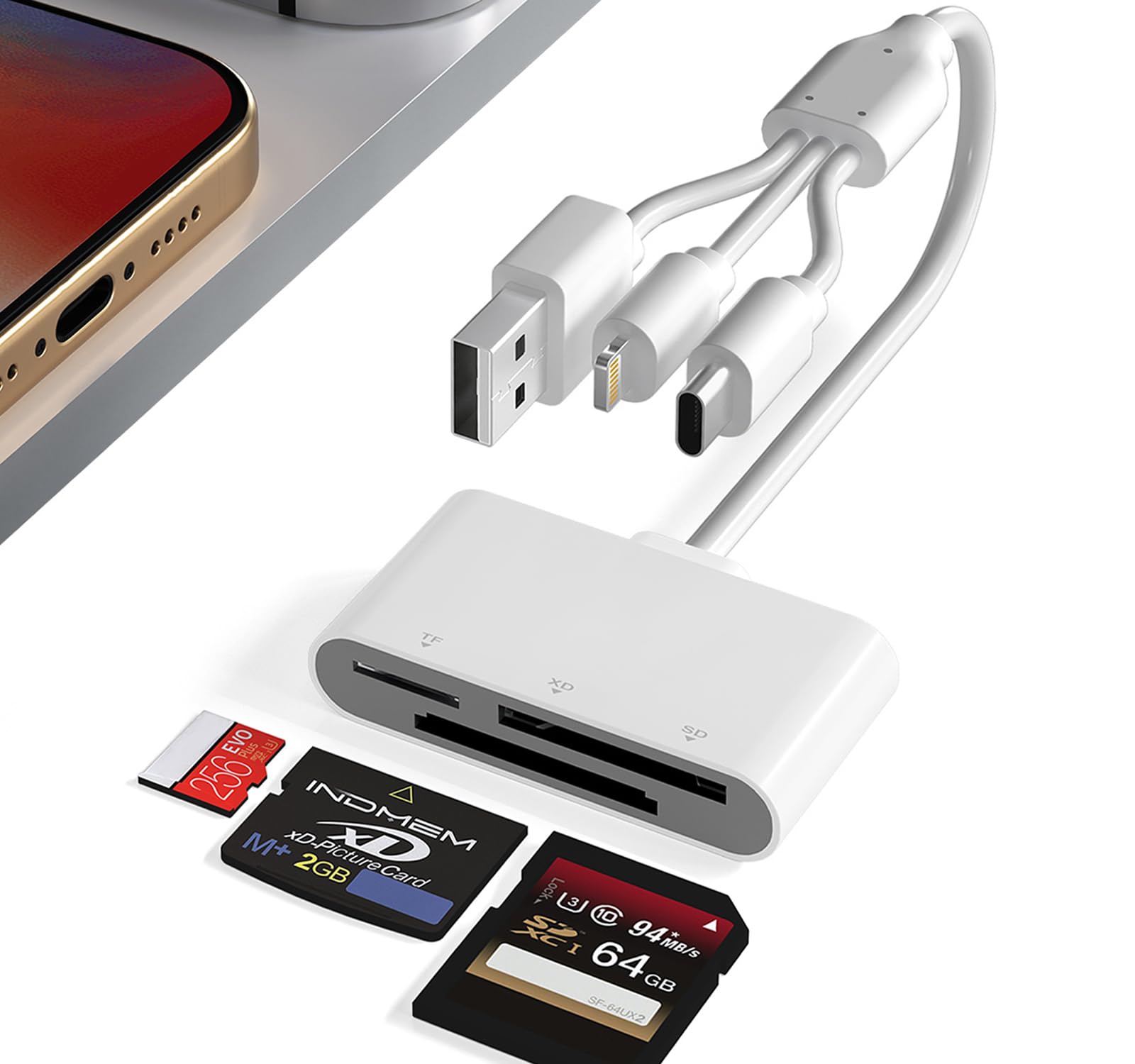
XD Card Adapter - 3 in 1 SD/Micro SD/XD Card Reader with Lightning+USB A+USB C Interface for iPhone 17/16/15/14/iPad/PC/Android/MAC, Plug & Play
$16.99
| Brand | Ardaddyn |
| Merchant | Amazon |
| Category | Computers |
| Availability | In Stock |
| SKU | B0FC2P4VJB |
| Color | 3 in 1 SD/TF/XD Card Reader |
| Age Group | ADULT |
| Condition | NEW |
| Gender | UNISEX |
| Google Product Category | Electronics > Computers |
| Product Type | Electronics > Computers & Accessories > Computer Accessories & Peripherals > Memory Card Accessories > Memory Card Readers |
About this item
XD Card Adapter - 3 in 1 SD/Micro SD/XD Card Reader with Lightning+USB A+USB C Interface for iPhone 17/16/15/14/iPad/PC/Android/MAC, Plug & Play
3 in 1 SD/TF/XD Card Reader: The xd card adapter comes with SD/TF/XD 3 card slots. It supports a wide range of card types such as olympus xD-Picture card, SD/SDHC/SDXC and microSD memory card.This design avoided need for separate card readers for each card format, thus saving both space and hassle. USB A+Lightning+USB C 3-in-1 Port Design: This xd and sd card reader features Lightning, USB-C, and USB-A ports, which is compatible with various devices and operating systems. Whether your use i-Phone/i-Pad PC or other USB C phone device, you can easily connect and use this card reader. High-Speed 480Mbps Transfer: Experience rapid file transfers with 480Mbps(max) speeds, perfect for photographers, videographers, and professionals handling large media files. Save time and boost efficiency. Note: Actual speed varies by device. Plug and Play: The xd memory card reader plug and play, eliminates the need for additional drivers. Simply connect it and start transferring data effortlessly. Say goodbye to complicated setup processes and enjoy hassle-free file access, easily transfer photo video and file information. Easy to Carry: Compact and durable with efficient heat dissipation, this lightweight reader fits easily in your pocket or bag—ideal for on-the-go file transfers and office use. The 15cm cable provides enough space to connect different devices without obstruction. Kind tips: Please make sure the memory card is correctly inserted into the card reader. If photos or videos cannot be transferred, unplug the card reader and memory card and reconnect them. (When some Android phones are plugged in for the first time, a format mismatch prompt may pop up and the U disk needs to be formatted. It can be used normally after formatting, and there is no need to perform this operation again in the future.)
3 in 1 SD/TF/XD Card Reader
Lightning+USB C+USB A Ports 3 in 1 Port Design
- USB C port supports iPhone 16, iPhone 15, Samsung Galaxy, Huawei, tablet, laptop, Macbook and so on.
- Lightning port supports iPhone 14/14 Plus/13/13 Pro/13 Pro Max/13mini/12/12 Mini/11 Pro/11 Pro Max/ XS Max/ XS and so on.
- USB A port supports PC and so on.
Multi Card Reader
- Comes with SD/TF/XD 3 card slots.
- Supports a wide range of card types such as olympus xD-Picture card, SD/SDHC/SDXC and microSD memory card.
- This design eliminates the need for separate card readers for each card format, thus saving space.
Note: Reading two cards at the same time is not supported.
Transfers Data Quickly and is Easy to Carry
- 480Mbps(max) transfer speed, it swiftly moves your data, saving you time and improving productivity.
- Compact design makes it easy to carry and use.
- Whether on the go or process data at the office, you can easily put it in your pocket or take it with you. Perfect for photographers, studios, and one dealing with large files.
OS How to store from phone to memory card?
- Insert the memory card into the card reader
- Then insert the caard reader into the iPhone find the "photos" app
- Select the picture or video you want to save to the memory card
- Click on "save to files"
- Find the card reader file and select Save File to complete the operation.(generally data of memory card is on “Untiled” or "NONAME", which is the name of your memory card)
OS How to store from memory card to phone?
- Insert the memory card into the card reader
- Then insert tthe card reader into the iPhone
- Find the "files" app, Click"Untitled"
- Selsct the photo or video you want to import into your iPhhone
- Select "Save Items" to complete the ooperation
Q: Which iOS and Android versions are supported by the SD/TF/XD card reader USB adapter?
- A: The SD/TF/XD card reader supports iOS devices running iOS 9.1 and above, as well as OTG-enabled Android smartphones/computers. However, for iOS 9.2 to iOS 12.4, only one-way import of photos and videos to Apple devices and the use of USB keyboards are supported. Word, Excel, PowerPoint, PDF reading, and USB mouse operation are not supported. Full functionality is available for iOS 13 and above.
Q: What precautions should be taken before inserting the card reader?
- A: Ensure that the direction of the memory card is correct before making sure that the SD card is properly inserted into the card reader. If there are issues with transferring photos or videos, try disconnecting and reconnecting the SD card reader and retrying the process.
Q: Why can’t it be used on my iPad pro/air?
- A: Your external storage device must be formatted using APFS or exFAT. Encrypted drives are not supported, nor are NTFS formats. All smartphones cannot
| Brand | Ardaddyn |
| Merchant | Amazon |
| Category | Computers |
| Availability | In Stock |
| SKU | B0FC2P4VJB |
| Color | 3 in 1 SD/TF/XD Card Reader |
| Age Group | ADULT |
| Condition | NEW |
| Gender | UNISEX |
| Google Product Category | Electronics > Computers |
| Product Type | Electronics > Computers & Accessories > Computer Accessories & Peripherals > Memory Card Accessories > Memory Card Readers |
Similar Products



Compare with similar items

AboveTEK Anti-Theft iPad Kiosk Stand, 36... |

Left Right Slide Rail Replacement Slider... |

Myra Bag Canvas Purses for Women - Fabri... |

Comfyable Leather Laptop Sleeve Compatib... |
|
|---|---|---|---|---|
| Price | $89.99 | $9.99 | $44.99 | $29.99 |
| Brand | AboveTEK | NSLikey | Myra Bag | Comfyable |
| Merchant | Amazon | Amazon | Amazon | Amazon |
| Availability | In Stock | In Stock | In Stock | In Stock |